

Description
Over time, your WordPress database accumulates a massive amount of unnecessary data—like post revisions, auto-drafts, orphaned metadata, and expired transients. This bloat slows down your site and increases your backup sizes.
Dejunk DB is a lightweight, intuitive, and highly secure tool designed to clean up this orphaned and duplicated data, optimizing your database for peak performance.
Before making any changes, Dejunk DB provides a built-in Backup Engine so you can safely create a snapshot of your database and download it locally.
🚀 Key Features
- Built-In Database Backups: Create, download, and manage secure
.sqlbackups of your database directly from the plugin dashboard before you clean. - Preview Before Dejunking: View the exact items (up to 500 records) that are flagged for deletion in a clean, AJAX-powered modal so you know exactly what is being removed.
- Post Data Cleanup: Safely remove Post Revisions, Auto Drafts, Trashed Posts, and Orphaned Post Meta.
- Comment Cleanup: Quickly delete Unapproved Comments.
- User & Term Cleanup: Clear out Orphaned User Meta and Orphaned Term Relationships.
- Options Cleanup: Flush stale and expired Transient Options (
_transient_and_site_transient_) that bloat thewp_optionstable. - Table Optimization: Run standard MySQL
OPTIMIZE TABLEcommands on all your WordPress tables with a single click. - Global “Dejunk Everything” Switch: A master switch to clean up all identified junk sections instantly.
- Clean Uninstall: When you uninstall Dejunk DB, it automatically cleans up its transients and securely deletes all backup files it created, leaving zero footprint.
Note: Any dejunking done to your database is irreversible. Please always utilize the built-in backup tool before running a cleanup.
Screenshots

Dashboard Overview: The modern Dejunk DB interface showing Database Backups, Dejunk Everything, and specific cleanup categories. 
Details Modal: Preview exactly which database rows (Revisions, Transients, etc.) are about to be deleted before confirming. 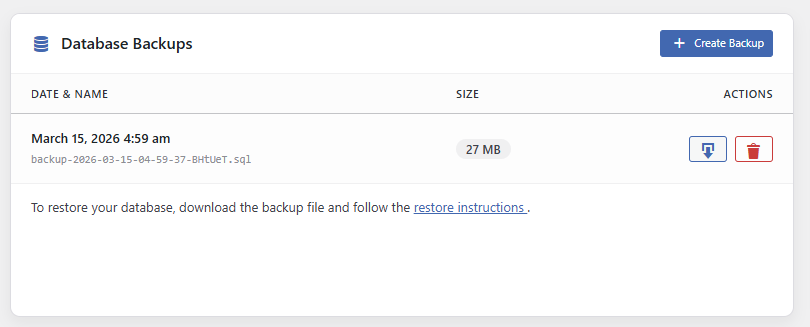
Backup Management: Easily generate, download, or delete .sqlbackup files with one click.
Installation
- Upload the
dejunk-dbfolder to the/wp-content/plugins/directory, or install the plugin directly through the WordPress plugins screen by searching for Dejunk DB. - Activate the plugin through the ‘Plugins’ menu in WordPress.
- Navigate to Tools -> Dejunk DB in your WordPress admin menu.
- Important: Click “Create Backup” in the Database Backups card.
- Review the junk categories and click “Clean” individually, or use “Run Global Dejunk” to clean everything at once.
FAQ
-
Is it safe to delete post revisions and orphaned meta?
-
Yes. Orphaned meta refers to data left behind when a post or user is deleted. Revisions are old versions of your posts. Removing them will not affect your live website content, but will significantly reduce database size.
-
Where are the database backups stored?
-
Backups are stored in your
wp-content/uploads/dejunk-db-backupsdirectory. The plugin automatically generates an.htaccessfile and anindex.phpfile inside this folder to block direct web access, keeping your backups secure. -
Can I restore a backup directly from the plugin?
-
For strict security compliance, automatic SQL restoration is not included in the plugin. To restore your database, simply download the
.sqlfile from the dashboard and import it using phpMyAdmin, WP-CLI, or your hosting control panel. -
Does Dejunk DB leave files behind if I uninstall it?
-
No. Dejunk DB hooks into the WordPress uninstall process. If you delete the plugin from the WordPress admin, it will automatically remove its generated backup folder and all
.sqlfiles to ensure no sensitive data is left behind. -
Why can I only view 500 items in the preview modal?
-
To prevent memory exhaustion and browser crashing on large sites that may have hundreds of thousands of junk rows, the preview query is intentionally limited to 500 items. The “Clean” action, however, will remove all of them.
Reviews
There are no reviews for this plugin.
Contributors & Developers
“Dejunk DB” is open source software. The following people have contributed to this plugin.
Contributors
Translate “Dejunk DB” into your language.
Interested in development?
Browse the code, check out the SVN repository, or subscribe to the development log by RSS.
Changelog
1.0.1
- Security: Removed automated SQL restore functionality for stricter security compliance.
- Security: Refactored all core database queries to use strict
$wpdb->prepare()parameterization. - Security: Added comprehensive nonce verification and capability checks for all AJAX actions.
- UI/UX: Removed inline JavaScript and implemented proper script enqueuing.
- Fix: Improved backup filename sanitization and backup directory protection.
- Feature: Added
uninstall.phpcleanup routine to securely remove backups and transients upon plugin deletion.
1.0.0
- Initial public release.